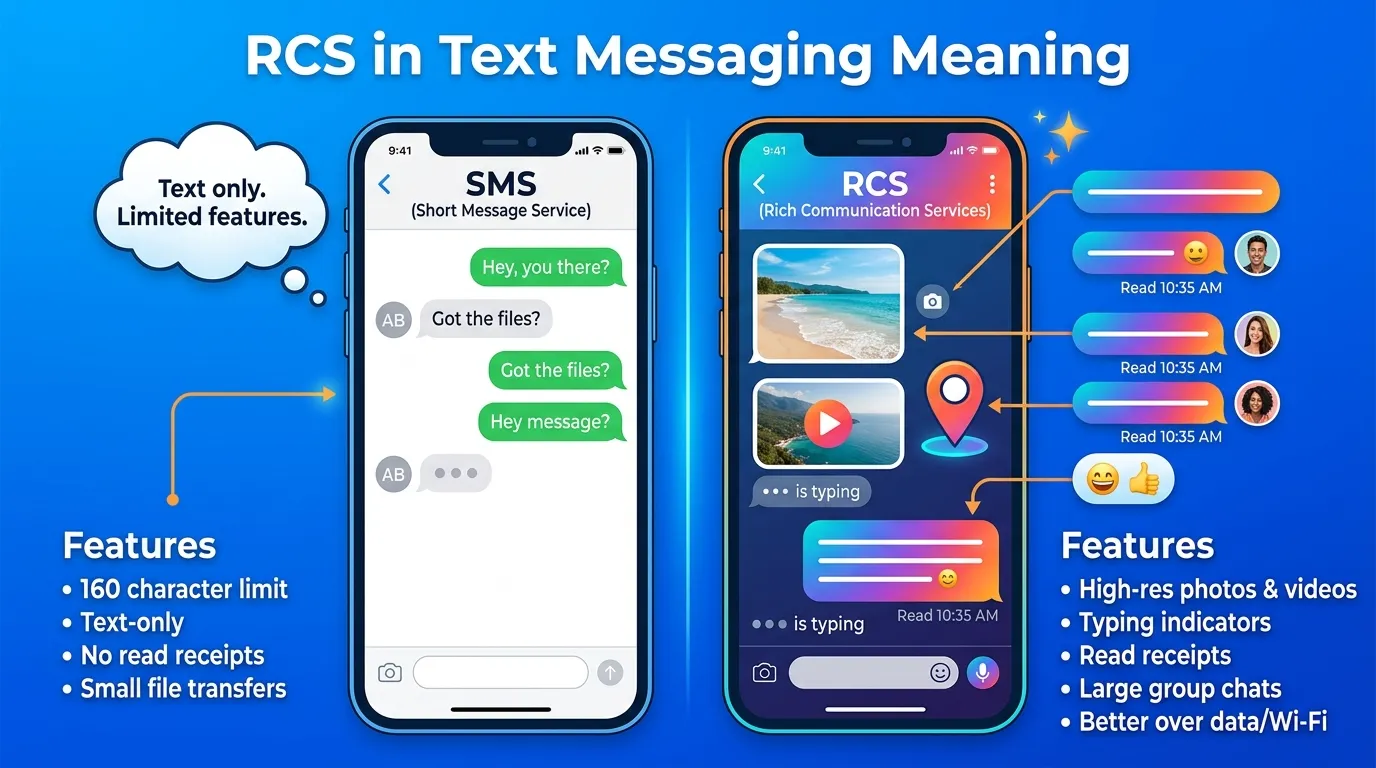
RCS in text message meaning comes down to one simple idea: it’s an upgraded version of basic SMS texting, built to feel more like modern messaging apps. RCS stands for Rich Communication Services.
You’ll notice RCS mostly on Android phones, and now on newer iPhones too, where it enables read receipts, typing indicators, and higher-quality photos and videos. It often shows up as a small label like “RCS chat” right in your messaging app.
People search for RCS because they suddenly see it appear in a conversation and aren’t sure what changed. Usually, it just means both people’s phones support the newer standard, and the conversation is running through Wi-Fi or mobile data instead of the older SMS network.
RCS Meaning in Text Messages
RCS stands for Rich Communication Services.
It’s an advanced messaging technology designed to replace traditional SMS (Short Message Service) and MMS (Multimedia Messaging Service) with more modern features.
For example, if someone sends you an RCS message, you may notice:
- Read receipts
- Typing indicators
- High-quality photos and videos
- Wi-Fi messaging
- Group chats with improved features
Unlike SMS, which only sends basic text messages through your mobile carrier, RCS works over the internet (Wi-Fi or mobile data) when available.
Is RCS Slang, an Acronym, or an Abbreviation?
RCS is a technical acronym, not internet slang.
It stands for Rich Communication Services and refers to a messaging protocol used by modern messaging apps.
Unlike abbreviations such as LOL or BRB, RCS isn’t something people normally type during conversations. Instead, it’s the technology that powers many messaging features.
What Does RCS Mean in Everyday Chat?
Most people don’t send “RCS” as part of a conversation.
Instead, they mention it when talking about messaging features.
For example:
“Do you have RCS enabled?”
This means the person is asking whether your phone supports Rich Communication Services.
Another example:
“Our chat switched to RCS.”
Here, it means the conversation is using advanced messaging features instead of standard SMS.
Where People Use RCS
Google Messages
RCS is most commonly used in the Google Messages app on Android devices.
For example:
“Turn on RCS Chat for better messaging features.”
Android Phones
Many Android smartphones support RCS through their default messaging apps.
Users can send higher-quality images, see typing indicators, and receive read receipts.
Samsung Messages
Some Samsung devices also support RCS depending on the carrier and region.
SMS Conversations
If RCS isn’t available, conversations automatically fall back to regular SMS or MMS.
Cross-Platform Messaging
More messaging platforms are beginning to support RCS, making conversations between different devices more modern and interactive.
Real Chat Examples
Below are 10 realistic conversations showing how RCS is used in text messages. In these examples, RCS refers to Rich Communication Services, the modern messaging standard.
Example 1
A: Why can I see when you’re typing?
B: We’re using RCS.
A: That’s pretty cool.
Example 2
A: My photos are better quality now.
B: That’s because RCS is enabled.
A: I noticed the difference.
Example 3
A: Did you read my message?
B: Yes, RCS shows read receipts.
A: That explains it.
Example 4
A: Why are my texts sent over Wi-Fi?
B: RCS uses an internet connection.
A: Good to know.
Example 5
A: I can see your typing indicator.
B: That’s one of RCS’s features.
A: It feels like a chat app.
Example 6
A: My messages look different today.
B: Your phone probably switched to RCS.
A: That makes sense.
Example 7
A: Can I send large videos now?
B: Yes, RCS supports better media sharing.
A: That’s helpful.
Example 8
A: Why didn’t my message use RCS?
B: The other person’s phone doesn’t support it.
A: Oh, that’s why it became SMS.
Example 9
A: Do I need Wi-Fi for RCS?
B: It works with Wi-Fi or mobile data.
A: Perfect.
Example 10
A: Is RCS better than SMS?
B: Yes, it offers more messaging features.
A: I’ll keep it enabled.
How to Reply When Someone Mentions “RCS”
If someone mentions RCS, they’re usually talking about messaging technology rather than using slang. Your reply depends on the conversation.
Funny Replies
If you’re chatting with friends, these playful replies work well.
- “My texts are getting an upgrade! 😄”
- “Welcome to modern messaging.”
- “No more old-school SMS!”
- “Technology keeps improving.”
Casual Replies
These are simple and natural responses.
- “That’s good to know.”
- “I’ll turn it on.”
- “Thanks for explaining.”
- “I didn’t know that.”
Friendly Replies
These responses help keep the conversation going.
- “I’ll check my settings.”
- “Thanks for the tip!”
- “That sounds useful.”
- “I’ll give it a try.”
Neutral Replies
If you’re discussing it in a more formal setting, these responses work well.
- “Understood.”
- “Thank you for the information.”
- “I’ll enable it.”
- “That makes sense.”
Is RCS Rude or Offensive?
No. RCS is not rude or offensive.
It stands for Rich Communication Services, a messaging technology that improves the texting experience with features like read receipts, typing indicators, high-quality media sharing, and internet-based messaging.
Because it’s a technical term, RCS is appropriate in both casual and professional conversations. It doesn’t express emotions or opinions, and it has no offensive meaning.
Who Uses This Term?
RCS is commonly used by:
- Android users
- Google Messages users
- Smartphone manufacturers
- Mobile carriers
- Technology enthusiasts
- Customer support teams
You’ll commonly hear RCS mentioned on:
- Google Messages
- Android phones
- Samsung Messages
- X (formerly Twitter)
- Technology forums
- SMS and messaging support articles
As more smartphones adopt advanced messaging features, RCS continues to become a more familiar term among mobile phone users.
Origin of the Term
RCS stands for Rich Communication Services, a messaging standard developed by the mobile industry to improve traditional SMS (Short Message Service) and MMS (Multimedia Messaging Service).
The technology was first introduced in the late 2000s to give text messaging features similar to popular messaging apps, such as read receipts, typing indicators, high-quality media sharing, group chats, and messaging over Wi-Fi or mobile data.
As Android smartphones became more advanced, RCS gained wider adoption through Google Messages and support from mobile carriers around the world. Today, it is considered the next generation of text messaging and is available on many Android devices. Support has also expanded across more mobile platforms, making RCS a more widely used messaging standard.
Unlike internet slang, RCS is a technical term used in the mobile and telecommunications industry rather than an abbreviation people type during conversations.
Comparison Table
| Term | Meaning | Type | Usage | Popularity |
| RCS | Rich Communication Services | Technical Acronym | Advanced text messaging technology | High |
| SMS | Short Message Service | Technical Acronym | Standard text messaging | Very High |
| MMS | Multimedia Messaging Service | Technical Acronym | Sending photos, videos, and media by text | High |
| iMessage | Apple’s messaging service | Messaging Platform | Messaging between Apple devices | Very High |
| Internet messaging app | Messaging Platform | Chatting, calling, and sharing media | Very High |
Unlike SMS and MMS, RCS offers modern messaging features such as typing indicators, read receipts, larger file sharing, and improved group chats over an internet connection.
Real-World Usage Example
Imagine you send a message to your friend using the Google Messages app.
A few seconds later, you notice “Typing…” appears on your screen, followed by a notification that your message has been Read.
Your friend says:
“We’re chatting through RCS instead of regular SMS.”
You reply:
“Now I understand why it feels like a messaging app.”
In this situation, RCS refers to Rich Communication Services, which provides advanced messaging features beyond traditional text messages.
People commonly mention RCS in situations such as:
- Enabling chat features on Android phones.
- Sending high-quality photos and videos.
- Using read receipts and typing indicators.
- Messaging over Wi-Fi instead of SMS.
- Troubleshooting messaging problems.
Because RCS is a messaging technology, it’s mainly discussed when talking about smartphones and text messaging features.
FAQs
What does RCS mean in text messages?
RCS stands for Rich Communication Services. It’s an advanced messaging standard that adds features like read receipts, typing indicators, Wi-Fi messaging, and high-quality media sharing.
Is RCS the same as SMS?
No. SMS only supports basic text messages, while RCS includes modern chat features such as read receipts, typing indicators, improved group chats, and better-quality media sharing.
Is RCS free to use?
RCS uses your mobile data or Wi-Fi connection instead of standard SMS. Whether it costs anything depends on your internet or mobile data plan.
Is RCS slang?
No. RCS is a technical acronym, not internet slang or a texting abbreviation.
How can I tell if I’m using RCS?
If your messaging app shows features like typing indicators, read receipts, high-quality photo sharing, or messages sent over Wi-Fi, you’re likely using RCS.
Conclusion
RCS stands for Rich Communication Services, a modern messaging standard that improves traditional SMS with features like read receipts, typing indicators, high-quality media sharing, and internet-based messaging.
You’ll most often hear about RCS in Google Messages, Android phones, and discussions about smartphone messaging. Unlike internet slang, RCS isn’t something people type in conversations it’s the technology that powers a better texting experience.
If you see RCS in your messaging app or phone settings, it simply means you’re using a more advanced form of text messaging than standard SMS.

Emily Thompson is a Research Writer at MeaningsHubb.com, focused on well-researched and easy-to-understand educational content.